Building an OS
Why collaboration belongs below applications, why native lost to the browser, and how resources and actions turn undo, search, accessibility and agents into one problem.
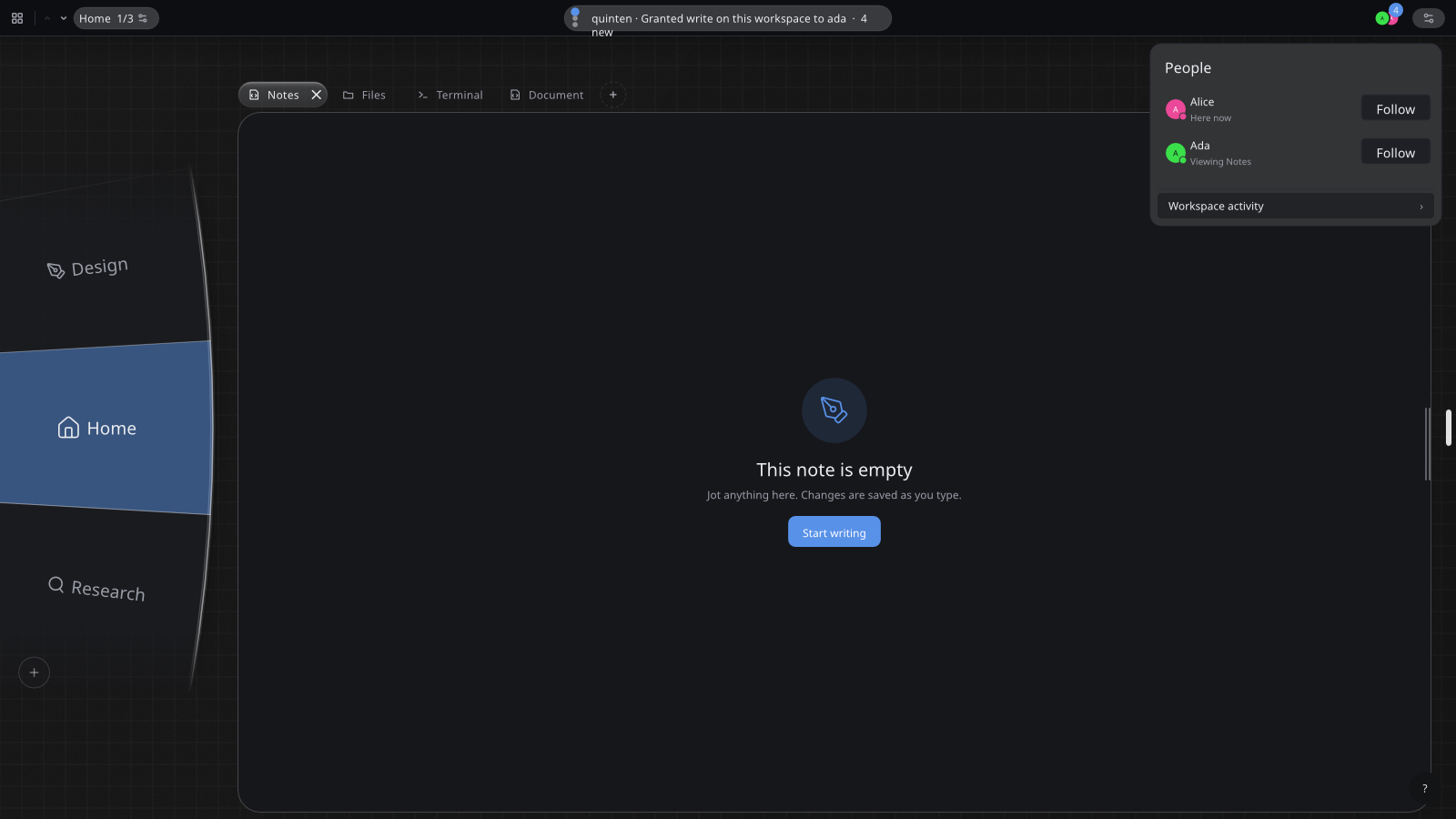
tilo is a Linux desktop environment, shipped as an image-based operating system. It runs normal Linux applications, and the pieces written for it are a Wayland compositor, a peer-to-peer filesystem, a CRDT-native UI toolkit, an application sandbox and runtime, and about fifty applications in varying states of (un)finished. It is currently in an early alpha stage, so do not install on hardware that is important to you or expect everything to work if you do.
A bit of history
A while ago I stumbled upon Ink & Switch and their work on CRDTs. For those unfamiliar: a CRDT (Conflict-free Replicated Data Type) is a data structure where two copies merge without anybody (some central server, for example) arbitrating who “wins”. These are a strange thing to be handed: it solves a problem most desktop software has decided not to have.
What I wanted to do with it was real-time collaboration, which seems like a fairly obvious use case. On the desktop that is essentially absent – the default is to just share your screen or send a file around, which means only one person can edit at a time. Even on the web, real-time collaboration is not the default, and every application that does have it has to implement it again (even though they often use CRDTs, too).
The case I keep coming back to is pair programming. Doing it properly when you are not sitting at the same table is genuinely hard. Either each application has to support it itself, or you hand somebody more or less unrestricted access to your whole machine, and neither of those feels like a mode the system actually supports. It is treated as an exception when it should be ordinary.
And I want it in applications where it is not obvious, which is the part that forces everything else. If collaboration only has to work in the document editor, it is a feature of the document editor. If it also has to work in the ebook reader, the file manager and the terminal, it cannot live inside applications at all, and you end up re-engineering the layer underneath them instead.
Put plainly: I want the software I use to be collaborative, native and secure. The resource and action model, the peer-to-peer filesystem and the sandbox are all what that turned into once I took it seriously.
The second thing I wanted to know was what is genuinely possible on a modern computer once you stop spending it on thirty years of legacy. I dislike the web as an application platform: everything takes 300 MB, every application looks and behaves differently from every other one, and none of that is under my control as a user. I want native performance, applications that open immediately, good typography (which the web has and most UI toolkits do not), and not to log in to everything separately.
One idea, which everything else follows from: applications should expose resources and actions, and keep nothing else to themselves.
A resource is a thing an application holds. A book, a video, a note, an annotation inside that book. An action is a change to one: add the highlight, rename the track, turn the page. Applications register both, and the state behind a resource is a CRDT the system owns rather than a private blob the application writes out when it feels like it.
Once the system can see every resource and every action:
- Search reaches everything, and no application builds its own search box.
- Undo, redo and history become system services instead of forty separate reimplementations, most of them worse.
- Collaboration turns into a transport problem, because CRDT state merges without a referee deciding whose edit won.
- Syncing between your own devices is that same problem, solved once instead of once per application. This also means self-hosting our applications is trivial (more on that in How things arrive).
- Accessibility works for screen readers, and so does automation, and so do agents, because all three read one enumerable list of what can be done.
- Any resource can be linked to and opened by whatever handles its type, the way a URL works, one level below files.
- A session can be serialised and restored, because the state has a declared shape rather than being whatever the application had in memory.
- Theming belongs to the system (so in other words, to you), because applications describe what they are showing instead of drawing it directly.
Not one of those is a feature anybody should be building twice. The rest of the desktop environment exists to make them real: peer-to-peer and relay networking (Iroh), a collaboration layer, an identity that outlives any single application, a filesystem that syncs. And the application runtime needs a sandbox worth the name, plus applications small enough that adding one is not an event.
Why bother, and why now
There are two main reasons why I think this is the right time to experiment with different desktop paradigms. This is a massive undertaking, even at the experiment stage, and I think there was no earlier point in the last ~30 years where two people could have built something like this.
First, none of this is from scratch. Every one of the pieces mentioned above is stitching together pieces other people built and generously let you build something on for free: smithay for the Wayland protocol plumbing, wgpu and vello for painting, taffy for layout, cosmic-text for text, Automerge for the CRDTs, Iroh for the networking, bubblewrap and Landlock and seccomp for the sandbox, bootc and Fedora underneath all of it.
The second reason I wanted to attempt this, and I know I will get flamed for this in large parts of the open source community, are LLMs, which allow us to produce working (well, somewhat) software (even if entirely experimentally) more quickly. Acknowledging what they do for my way of working must not mean ignoring the serious negative impact this technology, the circumstances under which it is being built, and the companies building it are having on society, on my industry, and on individuals.
That is why now. Why at all is a different question, and the answer starts with how thoroughly native lost. Microsoft has stopped defending native applications on Windows. Windows 11 replaced Microsoft’s Outlook, calendar and contacts app with the “New Outlook”, which is the Outlook website running inside a WebView2 window, and pushed the originals into read-only mode at the end of 2024. When Microsoft ships a webpage as the default mail client after having had the most well-known mail program ever for the 20 years before, you know that native (at least on Windows) is dead.
macOS and Linux still have decent native ecosystems, and they are separate ecosystems, so people write for the browser. Partly for reach, which I cannot fix (lol). Partly for developer experience: native has largely caught up on looking current, but on Windows it is no longer clear what “native” even means, and on Linux the best toolkits are opinionated in a direction that makes simple applications lovely and complex applications impossible (looking at you, GNOME :D). But mostly because on the web, trying something feels free. Click a link, it runs. Nothing was “installed”, no vendor had to be trusted, closing the tab leaves ~nothing behind. No desktop platform has ever offered that.
None of which argues for building another browser engine. The web is the most complete application platform there has ever been and got there by accumulation, but it was built to serve documents and had applications retrofitted onto it. Its primitives are frequently better than the native ones: text selection, copy behaviour and font rendering are all nicer in a browser than in most desktop toolkits, and <button> and <a> do what they say. The gap is everything above them. Every site ships its own navigation, its own modals, its own dropdowns, its own login, its own idea of what a settings page is, because nothing in the platform has consistency as its job. tilo ships a browser (just boring WebKit w/ Brave block lists), obviously; what it does not do is try to beat the browser at being one.
Doing any of this means being another platform, another packaging format, another set of APIs.
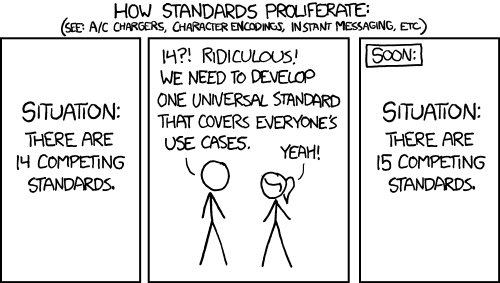
Which is the assumption I started with, and the reason the question above is worth asking at all: what if we just didn’t care about legacy support for a second and tried imagining something better? Fixing the desktop from inside the existing constraints means keeping everything already there working, and the constraint eats the idea before it is finished. What does installing software look like without thirty years of software & user expectations to accommodate? What does an application look like when collaboration is not bolted on at the end? Neither question survives a promise that nothing you have will break.
Which raises the obvious question: why an operating system, when most of this is a desktop environment and a runtime that could be installed on another distribution?
Four reasons, none of them purely technical.
- One definitive experience, rather than the same thing subtly broken across a dozen distributions.
- Packaging is hard. Shipping an early-stage desktop environment for other people to install is genuinely difficult, and this one carries more than a normal DE does: a filesystem, a runtime, an identity layer.
- An image is something you can boot in a VM and look at without touching the machine you actually use.
- Security. After some years on GrapheneOS, desktop Linux’s posture started to annoy me: full-disk encryption is a checkbox people skip, Secure Boot has been an afterthought for most of its existence,
sudoturns one password into unlimited root, and sandboxing is opt-in.
What it looks like
Open a book in the reader, highlight a paragraph, write a note on it. Invite somebody in and their cursor appears with their name on it; when they highlight something it shows up in their colour, immediately, on your screen. Press Ctrl+K, type a few words of the note you wrote, and the annotation comes back as a result with its own actions attached: edit it, delete it, comment on it. Drag the terminal’s tab onto the reader and the two share one frame. Open the book’s history and the annotations appear in order, with how far you had read drawn differently, because moving through a book changes your view of it without changing the book.
An ebook reader is an odd place to demonstrate collaboration, which is most of the point. Nobody would fund building real-time co-editing into one. But reading something alongside somebody else, or just having your notes and your place in the book turn up on your laptop because you left off on your phone, are obviously worth having the moment they cost nothing. They cost nothing here, because the reader did not implement them.
None of that was written by the ebook reader. It declares a book type, an annotation type, and about six actions.
The history view in that sequence is designed and not built yet. The rest runs today, and is what the screenshot above and the recording below show.
Windows do not overlap here. On most screens, for most people, a pile of overlapping rectangles buys nothing that tiling does not, and makes it easy to lose track of what is open. The layout comes from Niri: a virtual desktop is a horizontal strip of windows that cannot overlap and mostly share a height, movement along it is one-dimensional, and strips stack vertically, so what you move around in is a small two-dimensional space instead of a heap.
Four applications along one strip, panned across and back.
Tabs live above the applications, not inside them. A tab group is a compositor concept, so a terminal, a PDF and a browser can share one frame and no application had to implement tabs to participate. You may have seen the tab strip in the screenshot holds four different programs, this is why that’s possible.
The other visible layer is presence. Each person gets a colour, used everywhere: on their caret and pointer, with a name label attached (the “Ada” marker in the first screenshot), and behind text they are typing, like a highlighter, so a recent change carries its author. If they are on another screen of the same application, the navigation element leading there is marked in their colour. If they are on this one but scrolled out of view, coloured mist appears at the edge they went off.
Screen sharing mostly stops happening, because everyone is already in the same place and can work rather than watch.
Zoom out one level and that whole strip belongs to a workspace, which is the thing you actually switch between. It carries its own windows, its own collaborators and its own permissions, so “who is here” and “what may they touch” are properties of the place rather than of each application sitting in it. The disc down the left edge is how you move between them.
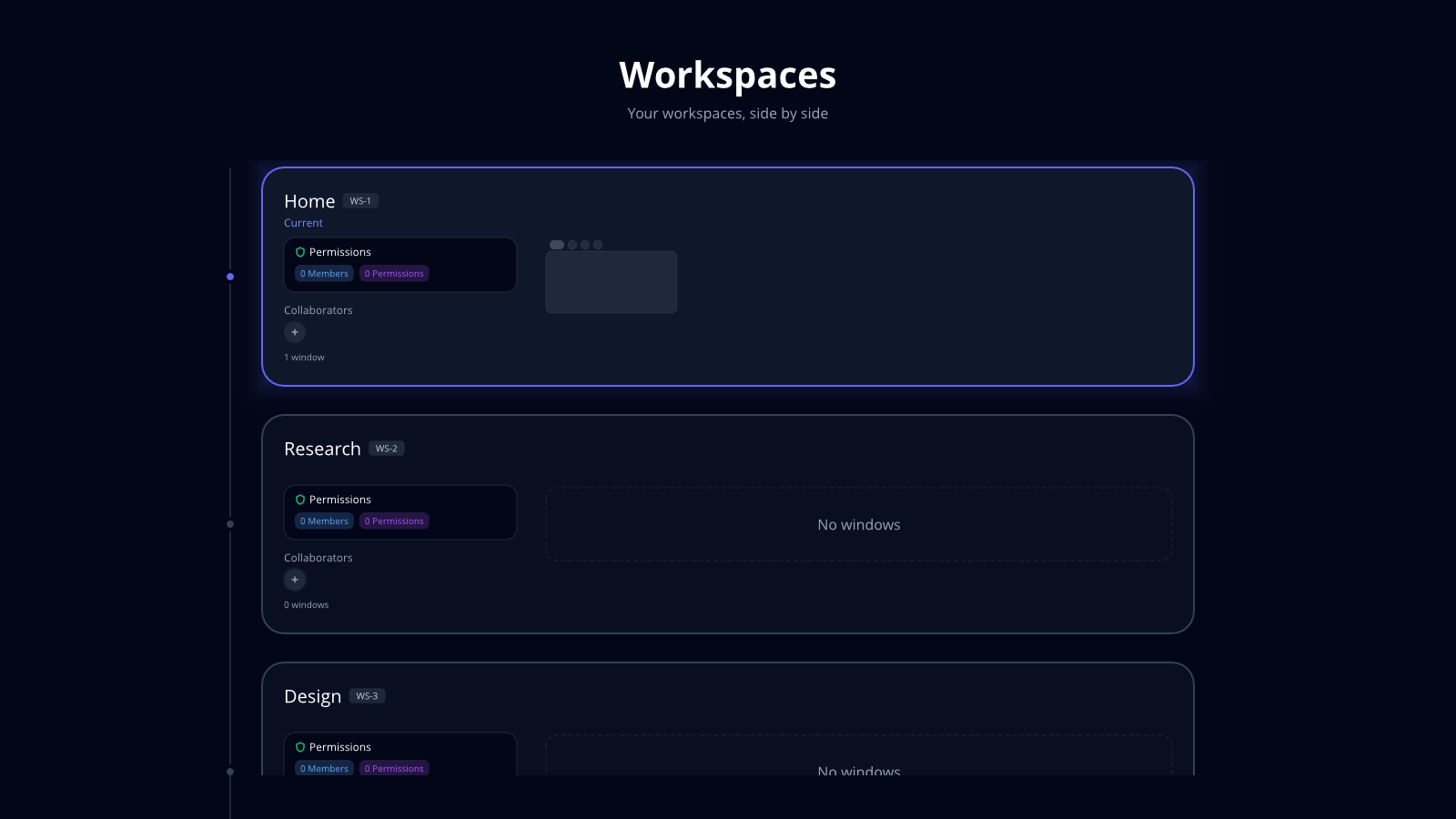
That is what makes the boundary worth having. A workspace shared with three colleagues and a workspace with your bank in it are different places, with different people in them and different things granted, and an application opened in one starts empty in the other. Your own devices see the same workspaces, because the state that syncs between them is the same state that syncs between people.
How it works
An application registers resource types, a view for each, and the actions that can be taken on them. It does not own the storage.
A resource is a thing: a book, a video, a note, a track, a file. The system decides where it lives and how it syncs. File associations already work a bit like this, with the OS holding the bytes and handing them to whichever application claims the type, except here it goes a level deeper and the file is not the smallest unit. An ebook is a resource; so is an annotation inside it, owned by the book. Resources nest, and the hierarchy is real enough to show as a tree of files to anybody who wants that.
Actions are the other half. Basic CRUD to begin with, plus whatever is specific to the type: turn to a page, jump to a timestamp, post a comment.
pub enum EbookAction {
    AddNote          { book_id: String, id: String, text: String },
    EditAnnotation   { id: String, note: String },
    DeleteAnnotation { id: String },
}
An action is small, serialisable and deterministic. Adding a highlight is one. Renaming a track is one. Scrolling is not, and neither is opening a sidebar. Payloads carry everything the change needs, including any freshly minted id, because apply has to be pure: no Uuid::new_v4() inside, no clock reads, no global state. Mint the id when the user clicks and put it in the payload, and the same action replays byte-identically on every peer that receives it.
That determinism is what makes two people in one document a transport problem rather than a design problem. Both sides apply the same action and land on the same state, so nothing has to referee. It is also what makes undo a system service: the shell brackets each action, records the boundary, and Ctrl+Z works the same in every application because no application implements it.
The command palette comes out of the same registration. Ctrl+K walks the resource tree and lists the actions it finds, scoped to the current application; Super+K widens it to everything. A toolbar button, a right-click entry and a palette row then dispatch one action rather than three near-identical code paths, and a screen reader, a shell script and an agent see that same list, because there is no second hidden route by which an application can change anything.
Search is the other half of that surface. An application says how to search its resource types and stops there: it builds no search interface, decides no ranking, and does not need to be running for its resources to be findable. Results are navigable rather than final, so you can search for a video, open its action list, pick “post comment”, and land in that application at that element ready to type.
History needs even less. Because the filesystem understands resource types instead of storing opaque files, an application only has to say how its resources should be described, and it gets a version history view it never wrote.
Underneath, the workspace directory is a FUSE filesystem built on Iroh. It syncs predictively and pays attention to the disk: opening document1.pdf starts caching document2.pdf, and when space runs short local copies are dropped, because they still exist on a server, on the workspace host, or on an organisation’s machine. Metadata arrives immediately through gossip and content is fetched on first read, so an open() succeeding does not mean the bytes were ever local.
It also understands file formats instead of treating them as opaque, which is what makes “what changed between these two versions” answerable rather than “the bytes differ”. Markdown, ODT and DOCX work today, and I will do Excel and the rest myself. But this is not a fixed list only I can extend: an application can teach the filesystem a format, so the long tail of legacy file types does not have to come from me.
The third thing a workspace carries, besides its people and its permissions, is a host: where the bytes actually live. That is what decides how any of this is deployed, and there are three versions of it behind one interface:
- Create a workspace locally and invite people. Collaboration happens peer to peer, with no cloud service in the middle.
- Point it at a machine of yours that stays on, and the result is an always-available workspace that nobody is renting to you.
- An organisation runs one on a server and everybody connects to it.
The resource and action model is the part we are still actively porting applications onto. Details in the status section below.
Sandboxing, and very small applications
Applications get no filesystem access by default. Not a short list of permitted paths: none. There is no manifest field with which to ask for one.
What they get instead is fixed: the payload read-only, the shared runtime read-only, a system read profile identical for every package (the loader, libc, fonts, GPU driver manifests, the CA bundle, timezone data), a tmpfs on /tmp, and exactly one writable directory. Everything beyond that is a capability granted while you watch. Three layers enforce it: bubblewrap for namespaces, seccomp for the syscall surface, Landlock for filesystem and network rights, each a backstop for the others.
That writable directory is per workspace rather than per application, so an application opened in one workspace cannot read what it wrote in another.
Here is a demo package printing what it can reach, from inside its own sandbox:
== sandbox probes ==
  read(        /proc/self/status): permission denied — blocked (bwrap or Landlock)
  read(              /etc/passwd): entity not found — blocked (bwrap or Landlock)
  stat(                     /tmp): OK
  write(      /tmp/tilo-hello-probe): OK
  write(      /var/tilo-apps/probe): permission denied — blocked (bwrap or Landlock)
Applications can be run without being installed, which means they have to be very small. Statically linked, a tilo application is 15 to 26 MB, almost all of which is the toolkit compiled in again. So the toolkit is also built as a shared library, versioned and content-addressed as its own bundle, mounted read-only into the sandbox. Applications link against that, and what is left in the binary is the application itself: under two megabytes, most of them well under.
That trade costs two optimisations. Whole-program optimisation works on what the compiler can see at build time, and once half the program sits behind a boundary that is only joined up at launch, it cannot see across the seam to inline through it. And a shared library has to unwind the stack frame by frame when something panics, rather than aborting the process outright, which is the cheaper thing a self-contained binary may do. Thin applications therefore compile under their own profile that gives up those two and keeps everything else, optimisation level and symbol stripping included. In practice they are as fast as the fat ones.
Being that small is what makes the two verbs honest. Open runs an application now, in an ephemeral workspace with no grants, and closing it leaves nothing behind. Add keeps it on disk instead of letting the cache drop it, and ranks it above things you have not added when you search. That is the entire difference: no installer runs, and nothing is written outside the application’s own directory.
Permissions get their own post in How things arrive. The short version is that most never become questions, because they are implied by something you already did, and what is left is a short list worth interrupting for, each with a “just this time” option and an indicator the compositor draws whenever it is live.
What ships with it
Shipping a desktop means shipping applications people can live in, so the list is long and deliberately unglamorous: word processor, spreadsheet, presentations, mail, calendar, contacts, files, terminal, browser, PDF reader, ebook reader, notes, music, video, a YouTube client, maps with real public transport routing, camera, a calculator that also does proper graphing, chat and calls, RSS, TOTP, weather, plus the system applications for settings, updates, firewall, disks, backups and remote machines.
A few I am deliberately not building yet, because the free software that already exists is better than a first attempt would be. Immich for photos is the clearest case. A password manager is the other, for a different reason: it is a genuinely dangerous thing to write and I am in no rush to prove otherwise.
How far along this is
Running: the compositor with its scrollable strips, cross-application tab groups and workspace disc; the peer-to-peer filesystem; the UI toolkit with its CRDT and presence layers; the package format with its sandbox; and image-level reproducible builds.
Partly running: the resource and action model. The spine, the palette and system-side undo work, and a growing set of applications are on it; porting the rest is ongoing.
Still early: multi-monitor polish, audio routing edge cases, resource history views, and real-world screen-reader coverage across every widget.
Trying it and helping
You can try a live shared workspace right now in your browser at tilo.coffee, or read the virtual-machine and OS documentation at tilo.sh. If you want the per-audience version of what this is and is not good for yet, read Who tilo is for.
The repository is at code.tilo.so/tilo/tilo. The most useful thing right now is telling us where the model breaks for the way you work: an application whose state does not fit resources and actions, a collaboration case the workspace model gets wrong, or an accessibility requirement we have not thought about. Reach me at [email protected].
Sources
- Windows 11 replacing Mail, Calendar and People with the new Outlook, and the read-only cutoff: AlternativeTo, June 2023
- The new Outlook’s WebView2 architecture and the reaction to it: XDA, “Microsoft is quietly turning Windows apps into websites”
- xkcd 927, “Standards”, by Randall Munroe, CC BY-NC 2.5
Beyond the components listed at the top, the ideas came from somewhere too. Ink & Switch did the research that makes local-first collaboration a thing you can build on rather than a paper. Niri demonstrated that scrollable tiling is correct. GNOME’s libadwaita and its Human Interface Guidelines are the standard I hold this interface to, complaints above notwithstanding. OpenStreetMap makes a maps application possible for someone who is not Google. Plan 9, Genode and Arcan are all in here somewhere.